LomandraImpact
Impact by Lomandra

Targets your whole supply chain reports against.

Pick the state you're working in and the policies that apply, and Impact sets up your workforce, local industry and environment targets. Subcontractors report hours, payments and site data each month, free, and the figures add up on their own.

Shown here for a made-up project with made-up companies.

impact · Cubberla Health Campus (sample)
Project to date
Workforce, local industry and environment targets
3 to review
19.9%
of hours by apprentices and trainees (target 12%)
10.1%
of spend with First Nations businesses (target 3%)
88.8%
of waste kept out of landfill (target 90%)
WorkforceLocal industryEnvironmentRegion: Queensland
Sept returnKenmore Electrical (sample), payroll fileSigned off
Sept returnGround Up Landscapes (sample), site sign-in fileAccepted
Sept returnYarrabee Civil (sample), hours look highSent back
Built forClients, head contractors and project teams
WorkforceHours from each employer's own payroll or sign-in exports
Local industrySpend down every tier, counted once
Free forSubcontractors and workers
Why Impact

Why not keep using spreadsheets and emailed returns?

Every state, ready to go

Choose the state or territory you're working in, whether there's Commonwealth money, and any rating schemes. Impact suggests the targets and plans that apply, and you keep the ones you want.

Hours from the source

Each subcontractor uploads an export from their own payroll or site sign-in system, so nobody retypes totals and nobody gives us access to their systems. Impact matches people, checks payroll against sign-in, and keeps the file with the month's evidence.

Workers own their details

People choose what they share, who sees it and which projects can count it. Small groups are hidden, so no one can be picked out of a report.

Screens

See it working.

Sample screens for a made-up project and supply chain.

←1 / 7→
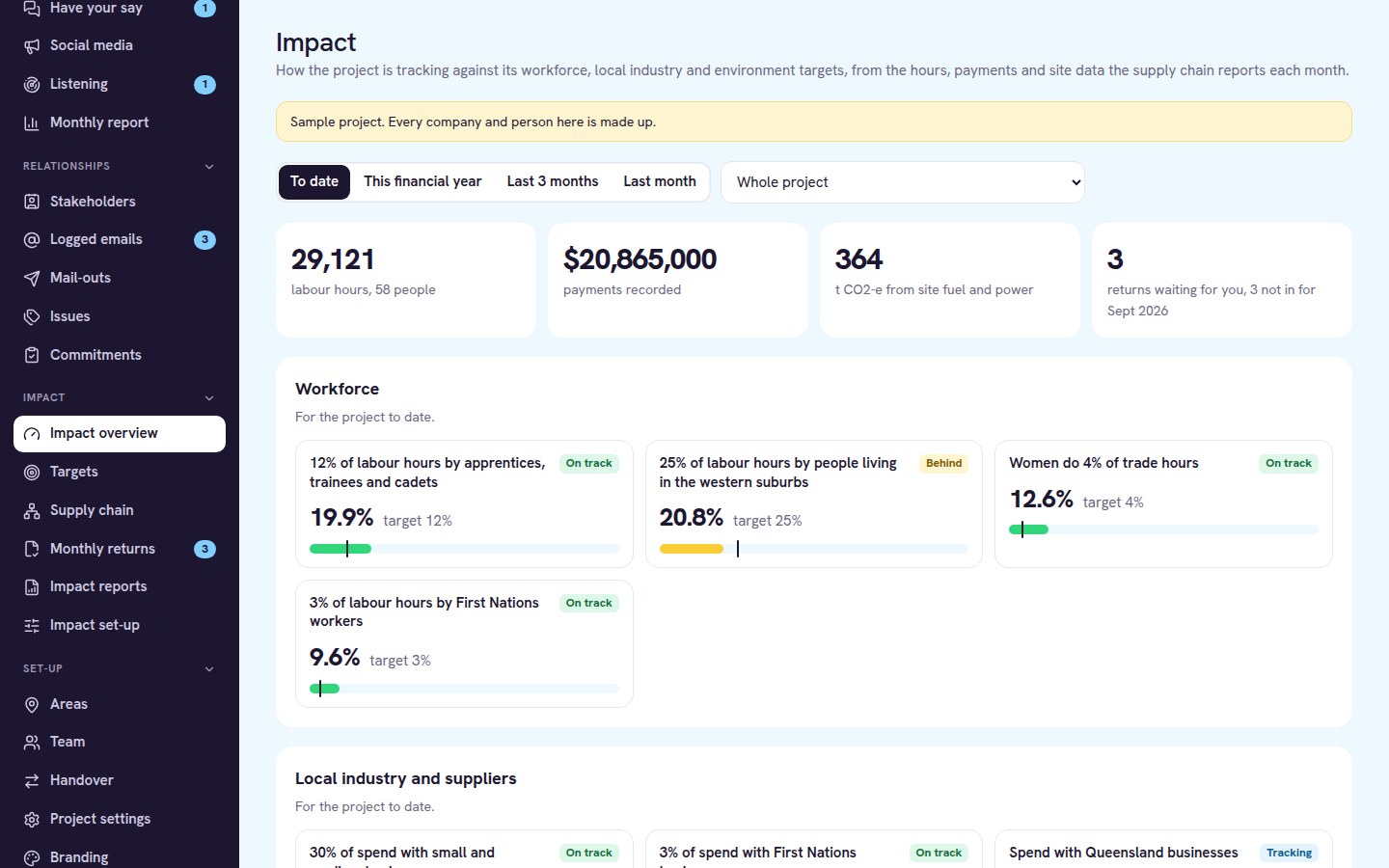
impact · Overview
Impact overview with workforce targets and progress bars for a sample project
OverviewEvery target with where it stands, worked out from the hours, payments and site data the supply chain reports.
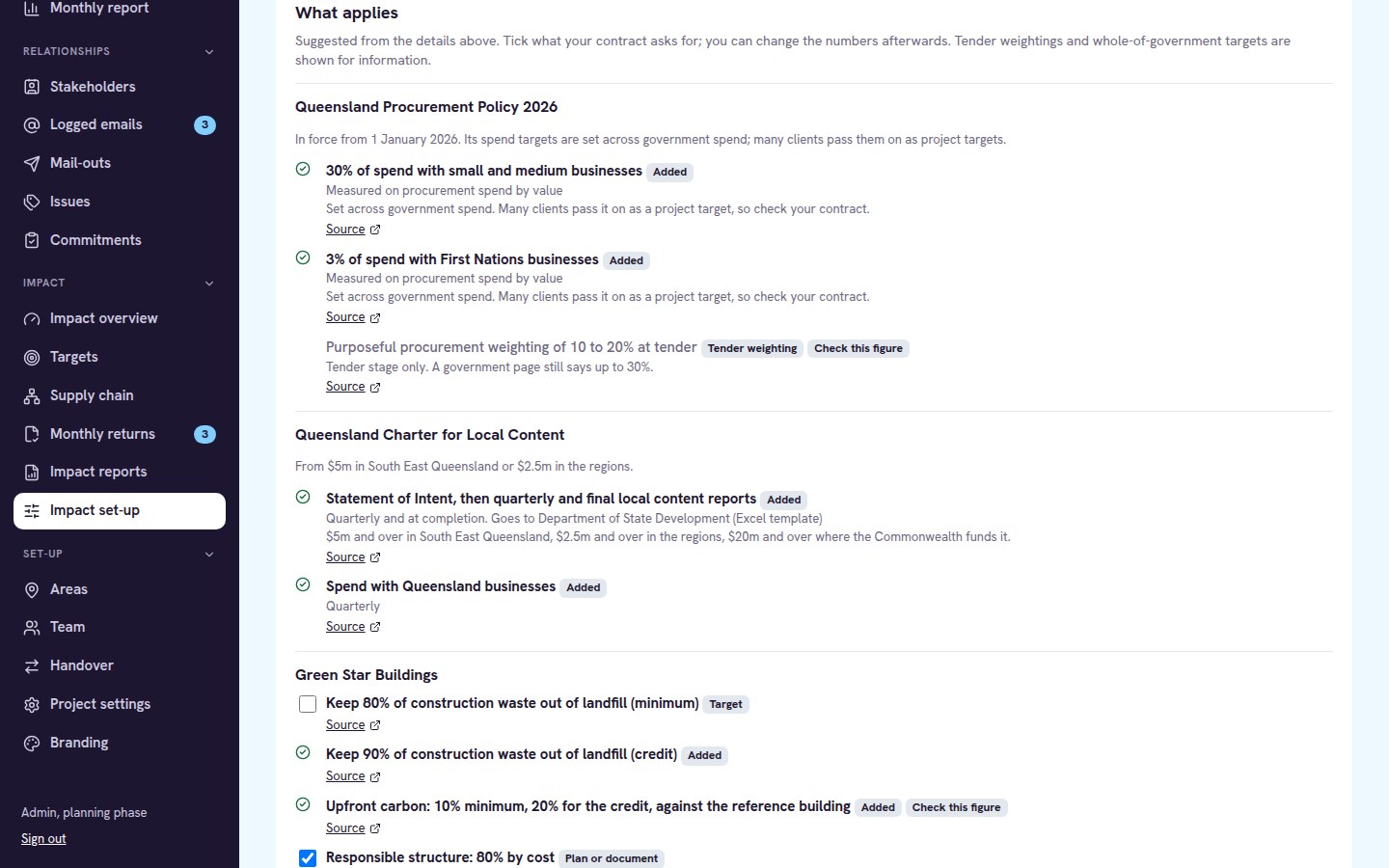
impact · Set-up
Suggested state policies and Green Star targets to tick for a project
What appliesPick the state and schemes, and Impact suggests the targets that apply, with a link to each source.
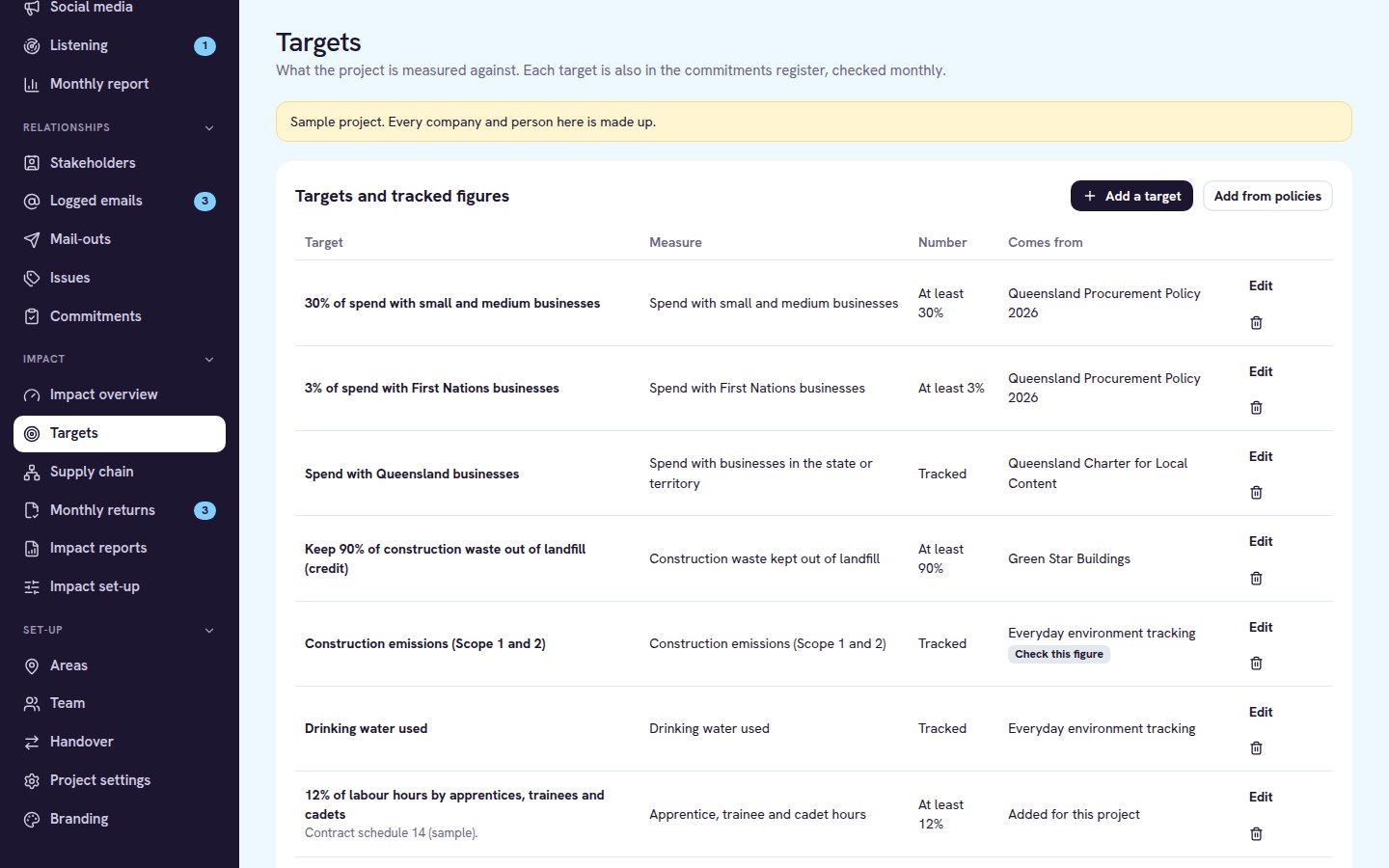
impact · Targets
Targets list showing each target, its measure and the policy it comes from
TargetsPolicy targets and your own contract targets side by side, each one also in the commitments register.
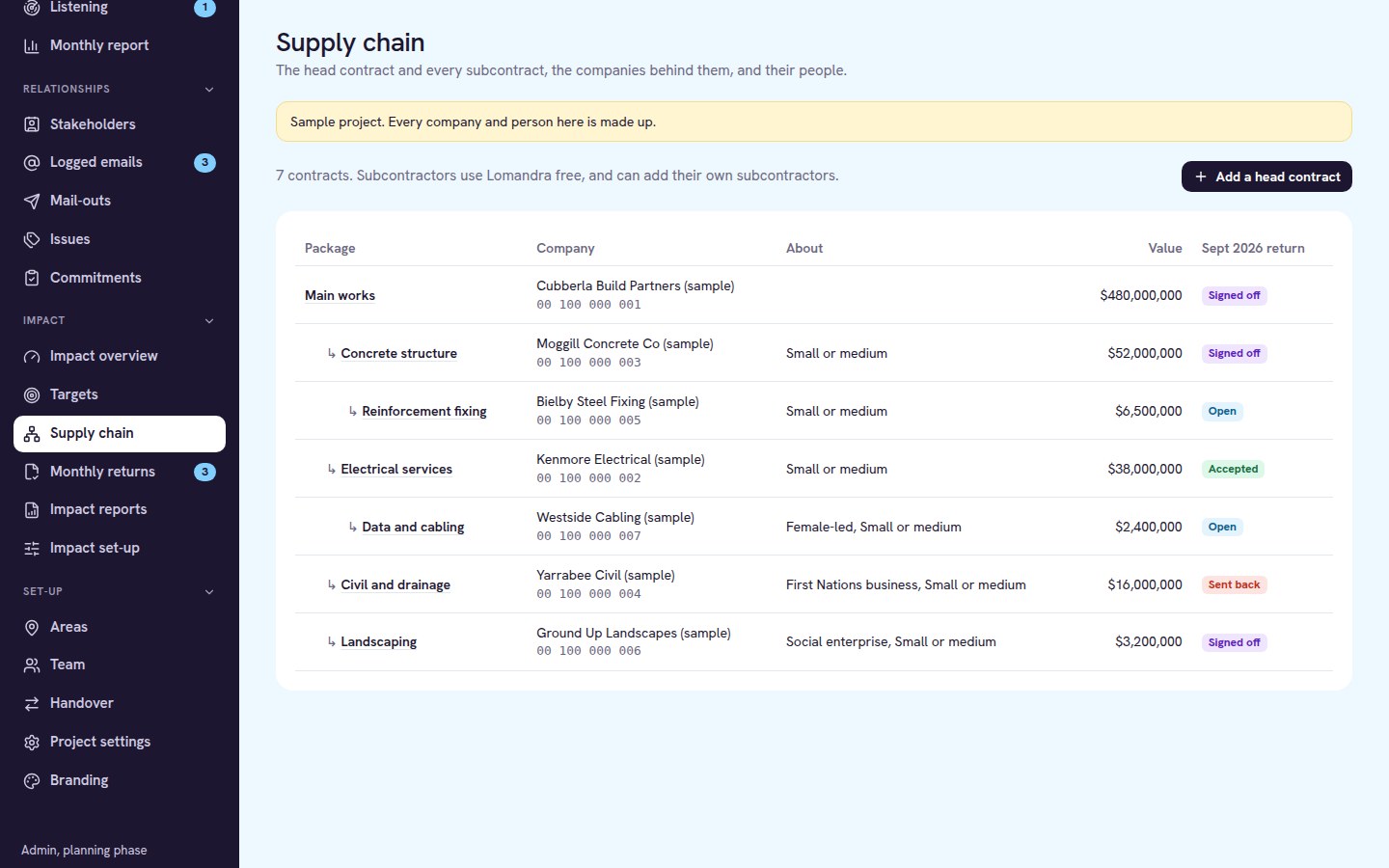
impact · Supply chain
Supply chain tree of sample subcontracts with each month's return status
Supply chainEvery subcontract at every tier, who the company is, and whether this month's return is in.
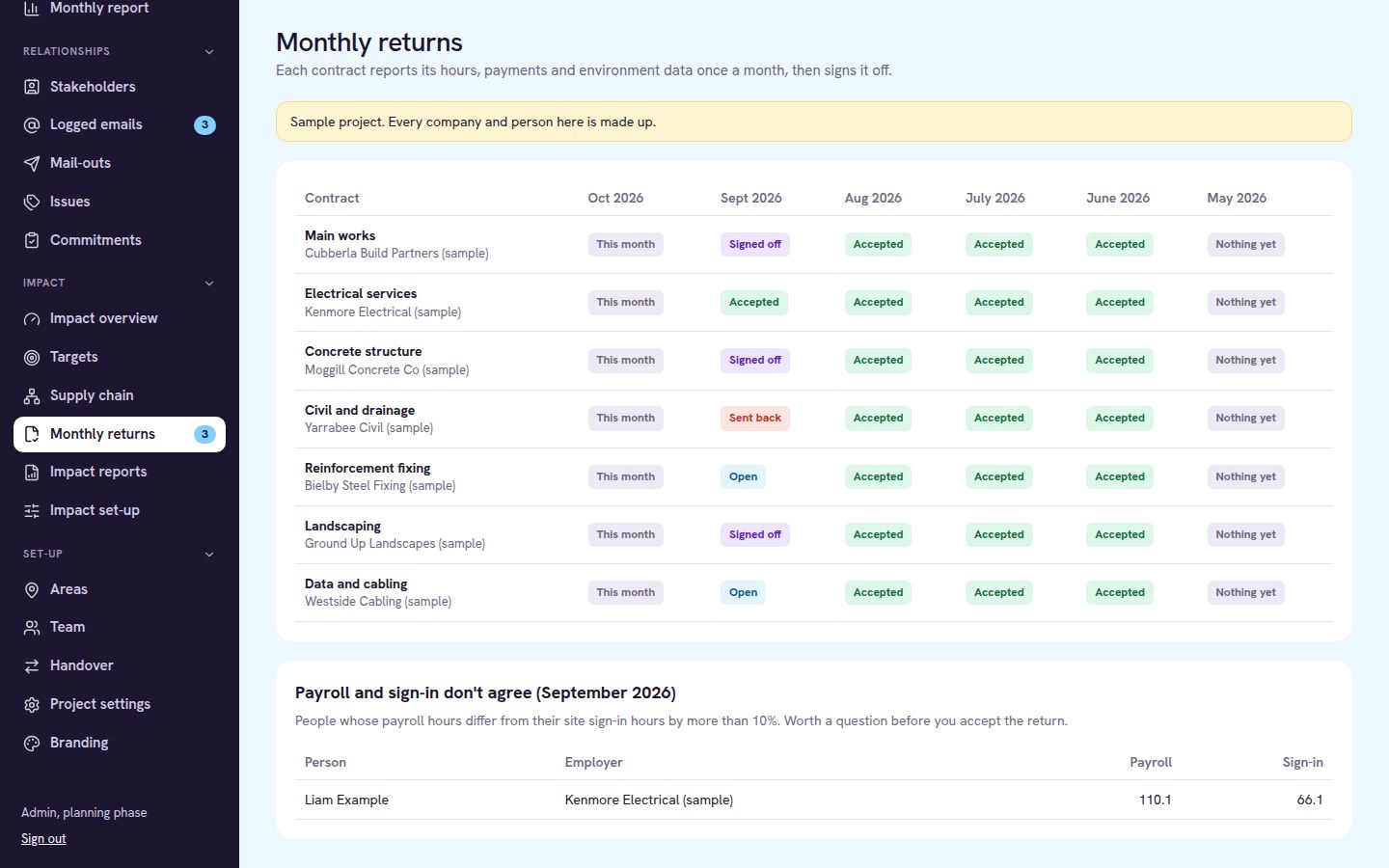
impact · Monthly returns
Monthly returns grid and a payroll versus site sign-in check
Monthly returnsWho has signed off, who hasn't, and where payroll and site sign-in don't agree.
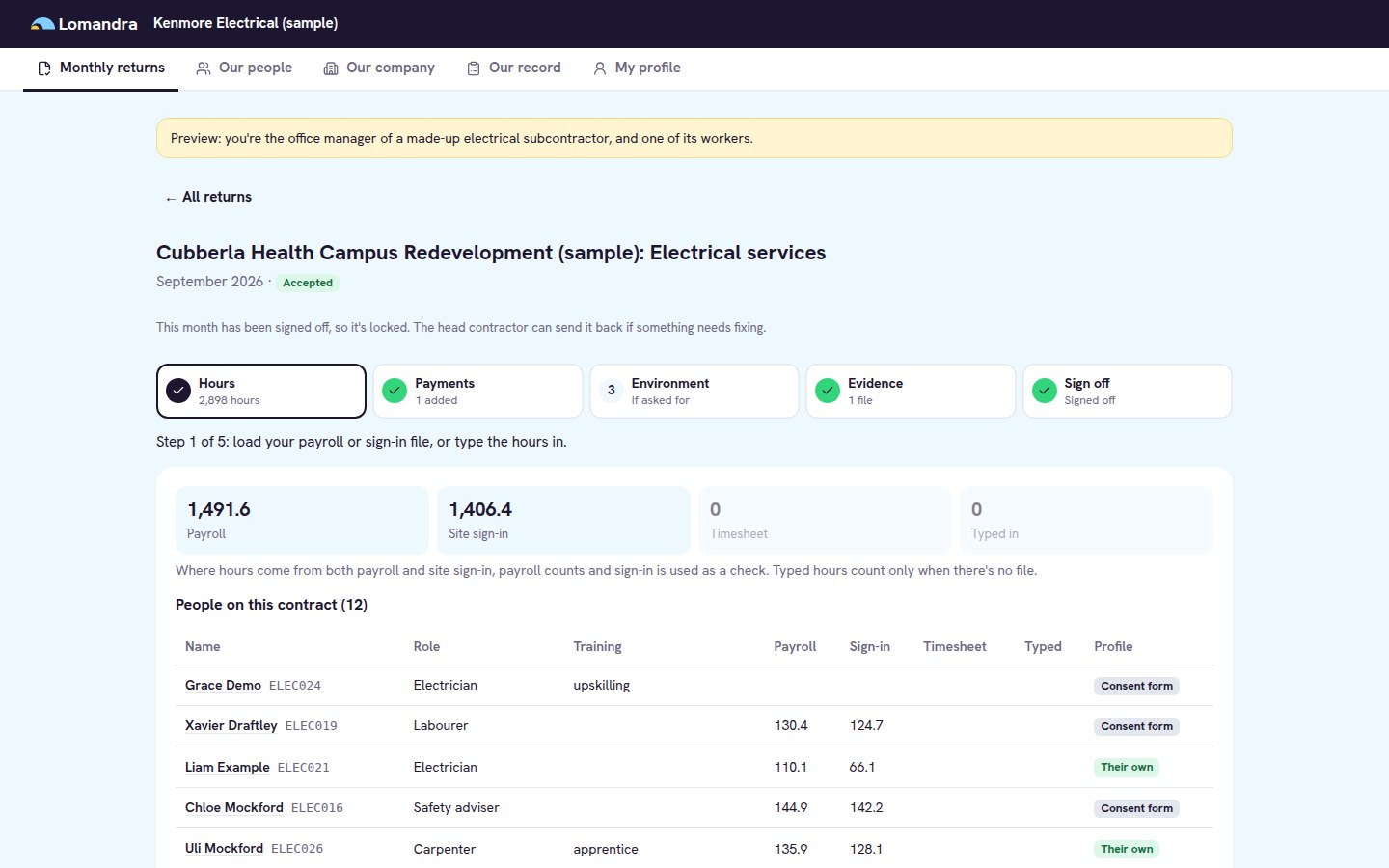
portal · Monthly return
A sample subcontractor's monthly return with payroll and sign-in hours per person
The subcontractor's viewFree for every subcontractor: load the payroll or sign-in file, add payments, sign off the month.
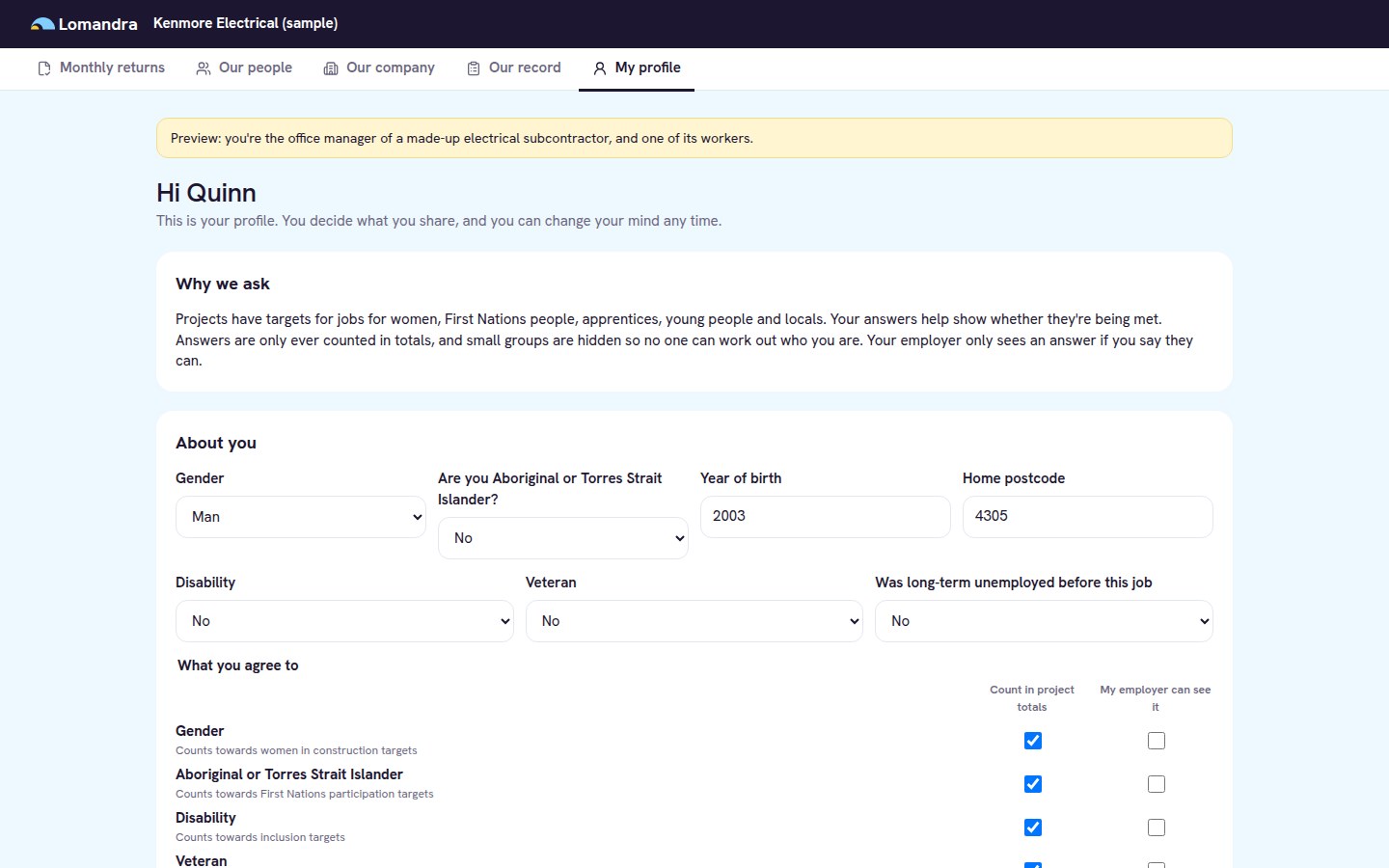
portal · My profile
A worker's profile where they choose what counts in totals and what their employer sees
The worker's viewWorkers choose what they share, what counts in project totals and what their employer can see.
Features and benefits

What each part does, and why it matters.

Every project gets all of it, and subcontractors and workers never pay. Already using Engage? Impact switches on in the same console, and each target also appears in Engage's commitments register with a result each month.

Feature
Why it matters
Every project
Included
Set-up
Region and policies
Pick a state or territory and see the policies, schemes and targets that apply
Start from the right rules, not a blank spreadsheet
Your team
✓
Your own targets
Add targets from the contract, the client brief or your bid, with yearly steps
Every promise tracked in one place
Client
✓
Environment targets
Waste, recycled content, cement replacement, water, renewable power and emissions
Sustainability tracked next to social outcomes
Client
✓
Workforce
Hours from files
Upload payroll or site sign-in exports, with the columns matched for you
No retyping, and every hour traces back to a file
Subcontractors
✓
Payroll and sign-in check
Compares payroll hours with site sign-in for each person and month
Spot gaps before the client does
Your team
✓
Worker profiles
Workers choose what they share, with their employer and for each project
Better data, with consent that stands up
Workers
✓
Small groups hidden
Figures about fewer than five people are hidden from clients and subcontractors
Report on targets without exposing anyone
ClientWorkers
✓
Local industry
Spend down the chain
Payments by every tier, counted once against what the head contract paid
Local and First Nations spend without double counting
Client
✓
Certification checks
Supply Nation and Social Traders certificates checked by your team for each project
Certified spend you can stand behind
Client
✓
A record that travels
Each subcontractor keeps its own record across projects, free
A reason for small businesses to keep their details up to date
Industry
✓
Reporting
Monthly sign-off
Each company signs off its month, and your team accepts it or sends it back with a reason
Your team
✓
Maintenance and support
Billed by the hour, from a skilled Australian-based professional
Help when you need it, without paying for a service you don't use
Your team
Optional
Reports and exports
Printable reports, CSV exports and a named learner register for training returns
Client
✓

Priced per project, depending on its size and how long it runs, with unlimited users. Subcontractors, their own subcontractors and workers never pay. The policy targets are a starting point: check them against your contract and the current policy documents before you rely on them.

Talk to us about pricing
How it runs

One month at a time, checked as you go.

Invite the supply chain

Add each subcontract by ABN and send an invitation. Subcontractors add their own subcontractors, so the whole chain reports.

Monthly returns

Each company uploads hours, payments and site data, then signs off its month. Your team accepts it or sends it back with a reason.

Locked once signed

A signed-off month can't be changed unless it's sent back, so the figures you report to the client stay put.

Set up with you

We load your targets with you and train your team and your first subcontractors, so the first month goes smoothly.

See Impact on your kind of project.

We'll set up a made-up project in your state, walk you through the targets and a month of returns, then talk about yours.